Unity Game Template Buying Guide : 12 Essential Checks
Imagine finding a Unity game template that looks exactly like the project you want to develop.
The screenshots look professional.

The gameplay video shows attractive environments, smooth animations, and interesting features.
The product description promises editable source code, customizable assets, and support for your preferred platform.
Everything seems promising.
But after purchasing the project, you discover that it uses an older Unity version, depends on unavailable plugins, or requires substantial changes before it can run on your target devices.
Suddenly, the affordable template becomes a much larger development task.
This is why choosing the right Unity game template involves more than comparing screenshots and prices.
A well-suited template can provide a useful foundation for gameplay development, visual customization, and future expansion.
However, the value of a template depends on its technical condition, included features, licensing terms, and compatibility with your development goals.
Whether you’re building an Android racing game, a PC simulator, or a casual mobile title, evaluating the project before purchasing can help you avoid unnecessary complications.
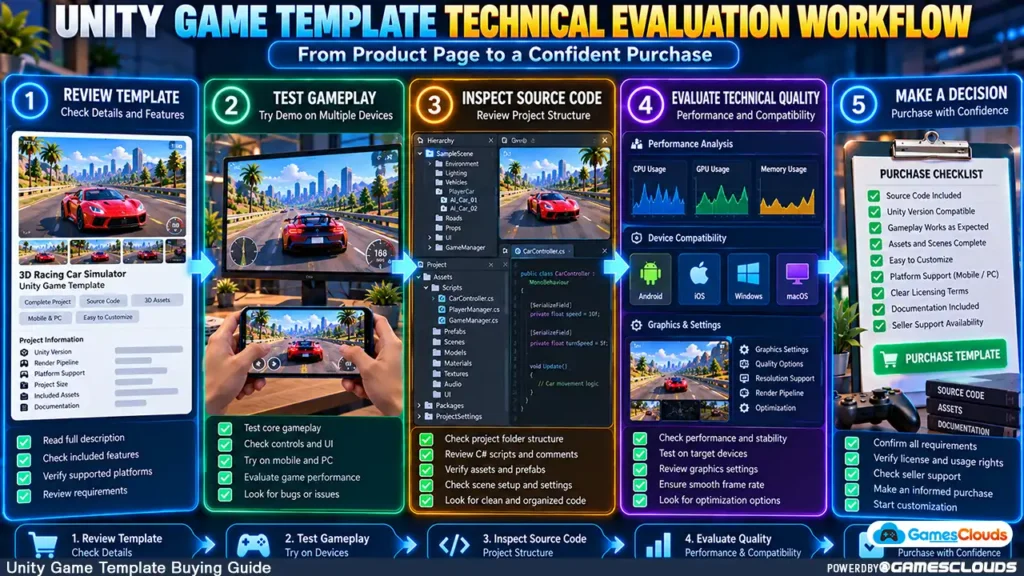
This guide explains 12 important checks to perform before buying Unity game source code.
1. Understand Exactly What You’re Buying
Not every Unity product provides the same type of development files.
Some products contain individual assets, such as characters, environments, or interface graphics.
Others provide gameplay systems, controllers, or reusable scripts.
A complete game template may contain several interconnected systems, including playable scenes, menus, progression, and game logic.
Asset Pack vs. Complete Game Template
An asset pack generally provides resources that developers integrate into their own projects.
A complete game template is intended to provide a broader development foundation.
For example, a racing game template might include vehicle controls, race management, checkpoints, AI opponents, and user interfaces.
Before purchasing, confirm whether the product contains a complete playable project or only selected components.
2. Check the Playable Demo
A gameplay demonstration is one of the most useful resources for evaluating a game template.
Screenshots show the visual presentation, but they cannot fully demonstrate how the game behaves.
What Should You Test?
If a playable demo is available, examine the main gameplay mechanics.
For a driving simulator, test steering, braking, camera movement, collision behavior, and level completion.
For a shooting game, check movement, aiming, weapon switching, enemy behavior, and mission progression.
For a supermarket simulator, evaluate product interactions, inventory systems, customer behavior, and interface navigation.
Don’t Judge Only the First Level
A polished main menu doesn’t establish that the complete project works correctly.
Explore different gameplay situations where possible.
If no playable demo is available, ask the seller for recent gameplay footage showing the actual project.
A video is useful evidence, but it doesn’t replace hands-on testing.
3. Verify the Unity Editor Version
Unity projects are developed using specific Editor versions.
Before purchasing, check which version was used to create the template.
For example, a project developed with Unity 2022.3 may require additional work when opened in a newer Unity 6 installation.
Why Version Compatibility Matters
Different Unity versions can introduce changes to packages, rendering systems, APIs, and platform requirements.
Opening a project in a newer Editor doesn’t guarantee that every script, shader, or plugin will continue working.
Ask for the Exact Version
Instead of accepting a general description such as “Unity 2022 compatible,” request the complete Editor version.
When the project files are available, the version can be checked in:
ProjectSettings/ProjectVersion.txt
Unity’s official documentation confirms that this file is used to identify a project’s Editor version. Unity Docs
If you intend to migrate an older project, read our Unity game template upgrade guide before making changes.
4. Confirm That the Source Code Package Is Complete
A compiled game and an editable Unity project are different products.
A playable Android application may demonstrate the game, but it doesn’t provide the files needed for further development.
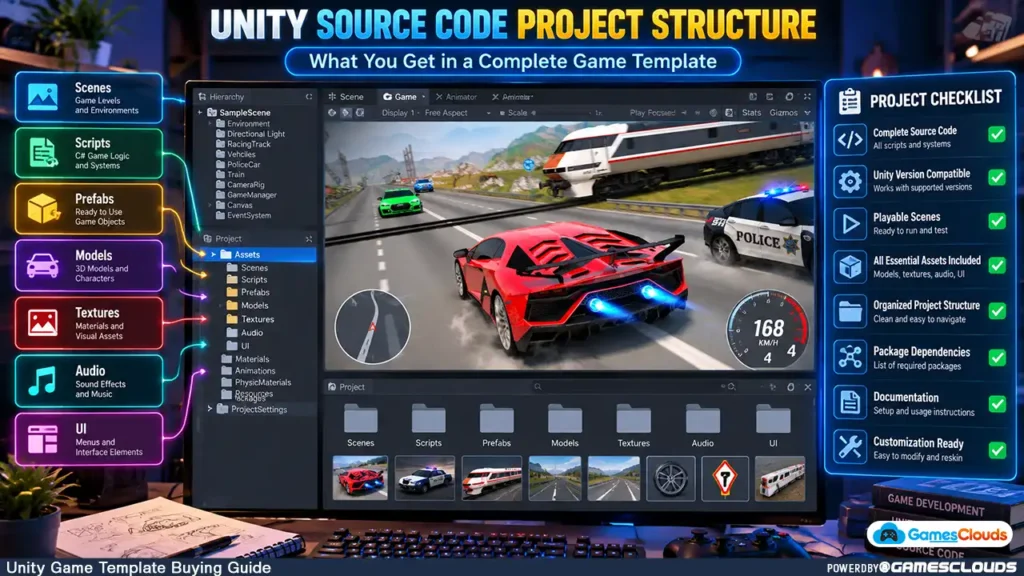
Important Unity Project Files
A typical editable Unity project includes several essential directories.
| Directory | Purpose |
|---|---|
Assets | Scenes, scripts, models, textures, audio, and other assets |
Packages | Package dependencies and related configuration |
ProjectSettings | Project-specific Unity configuration |
.meta files | Asset identifiers and import settings |
Unity’s official documentation explains the purpose of these project directories. Unity Docs
The Library directory contains generated data and can generally be rebuilt by Unity. It isn’t normally required in a clean source-code delivery.
Why Metadata Files Matter
Unity uses .meta files to preserve asset identifiers and import settings.
Missing metadata can result in broken references, disconnected scripts, or incorrect asset configurations.
Unity recommends preserving these files alongside their corresponding assets. Unity
Before purchasing, ask whether the product includes the complete editable Unity project rather than only exported game builds.
5. Review Third-Party Packages and Dependencies
Many Unity games depend on external packages.
These may include camera systems, animation tools, advertising SDKs, networking libraries, or specialized controllers.
Some dependencies are free, while others may require additional licenses or configuration.
Understand the Package Manifest
Unity stores project package dependencies in:
Packages/manifest.json
The Package Manager reads this file to determine which packages the project requires.
Unity also maintains a packages-lock.json file that records resolved dependencies and helps reproduce consistent package configurations. Unity Docs
Questions to Ask the Seller
Find out whether the project requires paid plugins, external accounts, or separately downloaded assets.
Ask whether all required dependencies are included or clearly documented.
A project that relies on unavailable components may require additional development work before it can be used.
6. Evaluate the Quality of the Gameplay Systems
A game template should provide more than attractive artwork.
Its gameplay systems should be suitable for the project you intend to develop.
Look for Functional Completeness
Consider a Unity car-parking template.
The project may contain several vehicles and attractive environments, but you should also examine its parking mechanics, level progression, camera controls, and vehicle-selection systems.
If those systems don’t match your requirements, customization may involve substantial programming.
Consider Code Maintainability
When source-code inspection is permitted, look for understandable class names, organized scripts, and reasonable separation between gameplay systems.
A project where every feature depends on one large script can be more difficult to maintain.
However, folder structure and code formatting alone don’t establish overall code quality.
Functional testing and technical review are also important.
7. Confirm Target Platform Compatibility
A template advertised for Android, PC, or multiple platforms should be evaluated against your intended release environment.
Android Development
Check whether the game supports touch controls, appropriate screen resolutions, and the Android build requirements relevant to your release.
PC Development
For Windows games, verify keyboard and mouse controls, resolution handling, and any gamepad functionality you require.
Cross-Platform Development
A Unity project may support multiple build targets, but this doesn’t mean every platform has been fully tested.
For example, converting a mobile game to PC may require interface changes, new input mappings, and graphics adjustments.
Ask which platforms have working builds and which require additional development.
8. Evaluate Performance on Real Devices
A game that performs well in the Unity Editor may behave differently on a smartphone or lower-end PC.
Performance depends on rendering complexity, memory usage, scripts, physics, and other factors.
What Should You Check?
For mobile games, consider loading times, frame stability, device temperature, and memory usage.
For PC games, evaluate performance on hardware representative of your intended audience.
Use Actual Performance Measurements
If the seller provides a demo, test it on suitable hardware.
After obtaining the project, developers can use the Unity Profiler to investigate CPU, memory, and rendering behavior on target devices.
Unity recommends collecting performance data from the actual target platform because Editor performance isn’t always representative of the final application. Unity Docs
Avoid relying exclusively on claims such as “fully optimized” without understanding the target hardware and testing conditions.
9. Check How Easily the Game Can Be Customized
Many developers purchase templates because they want to create a game with their own visual identity.
However, customization flexibility varies.
Evaluate Asset Replacement
Can you replace characters, vehicles, environments, and textures without rebuilding major gameplay systems?
Are the important assets organized and accessible?
Examine UI Customization
Check whether menus, icons, buttons, and other interface elements can be modified.
For example, a developer purchasing a driving game may want to redesign the vehicle selection screen while preserving the existing purchase and unlocking systems.
Understand the Reskinning Workload
Some changes are straightforward.
Others require modifying animation rigs, colliders, prefabs, or gameplay scripts.
Our Unity game reskinning tutorial explains how visual customization can affect existing game systems.
10. Review Advertising, Purchases, and External Services
If your planned game includes monetization, determine whether the template already supports the required systems.
A project might contain advertising integration, in-app purchases, analytics, or cloud saving.
However, the presence of an SDK doesn’t guarantee that it is correctly configured or compatible with your intended release.
Ask About Existing Integrations
Identify which services are included and which must be added separately.
Also confirm whether the project contains old account identifiers, API keys, or configurations that need replacement.
Test Monetization Separately
If rewarded advertising is included, verify that rewards are granted correctly.
For implementation details, see our AdMob rewarded ads Unity guide.
Avoid assuming that an existing advertising integration will work without updating its configuration and reviewing current platform requirements.
11. Understand Licensing and Commercial Usage Rights
Technical compatibility is only one part of a purchasing decision.
You also need permission to use the source code and included assets for your intended project.
Commercial Publishing Rights
Before purchasing, confirm whether the license permits modifying and publishing a commercial game.
Also determine whether it allows one application or multiple projects.
Third-Party Assets
Some templates contain models, audio, textures, or plugins created by other developers.
These components may have separate licensing restrictions.
Source Code Resale
Permission to publish a compiled game doesn’t automatically mean you can resell or redistribute the editable source code.
GamesClouds publishes a Single App License Agreement describing permissions and restrictions for products covered by that license. GamesClouds
For a detailed explanation, read our Unity source code licensing guide.
Always review the applicable product-specific terms before purchasing.
12. Check Seller Support and Project Documentation
Even a well-developed Unity project may require assistance during setup or customization.
Before purchasing, understand what support the seller actually provides.
Important Support Questions
Ask whether installation guidance, dependency information, and basic setup documentation are available.
Clarify whether support covers initial setup, existing project bugs, Unity upgrades, or custom modifications.
These are different types of work.
Confirm the Support Period
Some sellers provide limited technical support, while others offer extended assistance.
Don’t assume that every service is included indefinitely.
Request clarification about the support duration, communication method, and any additional charges for custom development.
If you’re evaluating a GamesClouds product, you can contact GamesClouds support to clarify the product’s technical requirements before purchasing.
How to Make the Final Buying Decision
After reviewing the technical requirements, organize your findings into three categories.
| Evaluation Result | Meaning | Recommended Action |
|---|---|---|
| Ready to Evaluate Further | Requirements are clear, and available evidence supports the intended use | Proceed with normal purchasing checks |
| Needs Clarification | Some dependencies, features, or compatibility details remain uncertain | Ask the seller for additional information |
| Significant Risk | Essential functionality is missing, required components are unavailable, or rights are unclear | Resolve the issue before purchasing or consider another template |
This approach is more useful than selecting a product based only on its price.
A less expensive template may require additional programming, artwork, or troubleshooting.
A more expensive project isn’t automatically better either.
The important question is whether the project provides a suitable foundation for your intended game.
Practical Example: Evaluating a Unity Car Parking Template
Imagine you’re planning to develop an Android car-parking simulator.
You find a template with several vehicles, parking levels, and customization features.
Before purchasing, you should confirm the Unity version, playable demo availability, supported Android devices, vehicle physics, and included project files.
Next, review whether you can replace vehicle models, create additional parking environments, and modify the interface.
If the project contains advertising or third-party plugins, identify their configuration requirements.
Finally, confirm the license and available technical support.
For a real product listing to examine, explore the Real Car Parking Unity Source Code on GamesClouds.
Its published description includes the Unity version, target platforms, gameplay features, and customization information. GamesClouds
Use those details as a starting point for evaluation, not as a substitute for independent testing.
Common Mistakes When Buying Unity Game Templates
One common mistake is purchasing a template based entirely on screenshots.
Another is assuming that a project advertised as editable will be easy to customize in every area.
Developers may also overlook paid dependencies, older SDKs, unsupported platforms, or missing documentation.
A particularly important mistake is confusing access to source code with unrestricted ownership.
Finally, avoid assuming that a project described as ready for publishing automatically meets every current requirement of your intended storefront.
Technical compatibility, licensing, customization, and release preparation should be evaluated separately.
Conclusion
Buying a Unity game template can be a practical way to begin a new development project.
However, the right purchasing decision depends on more than graphics, price, or the number of advertised features.
A reliable evaluation should consider gameplay functionality, Unity compatibility, source-code completeness, package dependencies, performance, customization flexibility, licensing, and technical support.
These checks help developers understand what they’re purchasing and what additional work may be required.
The best Unity game template isn’t necessarily the one with the most features. It’s the one that provides the most suitable foundation for your development goals.
At GamesClouds, developers can explore editable game projects across multiple genres.
Browse our Unity game source codes and templates to compare available projects.
If you need help customizing an existing template or developing additional features, explore our game development and customization services.
Frequently Asked Questions
1. What should I check before buying a Unity game template?
Check the Unity Editor version, playable demo, source-code completeness, supported platforms, gameplay functionality, third-party dependencies, performance, licensing terms, and seller support.
2. Can I publish a game made from purchased Unity source code?
You may be able to publish a commercial game if the applicable license permits it. However, you must also verify third-party asset rights and comply with the requirements of your chosen publishing platform.
3. How do I know whether a Unity source-code package is complete?
A typical editable Unity project includes the Assets, Packages, and ProjectSettings directories, along with the necessary metadata files. The project should also contain the scenes, scripts, and dependencies required for its advertised functionality.
4. Should I buy a Unity template developed with an older Editor version?
An older Unity version doesn’t automatically make a template unsuitable. However, you should evaluate compatibility, plugin availability, target-platform requirements, and the potential work involved in upgrading the project.
5. Is buying Unity source code cheaper than developing a game from scratch?
A suitable template can reduce the amount of work needed to implement existing gameplay systems. However, total development cost depends on customization, additional features, artwork, testing, technical compatibility, and publishing requirements.