

Unity Game Source Code Licensing: Complete Guide
Imagine purchasing a complete Unity racing game source code.
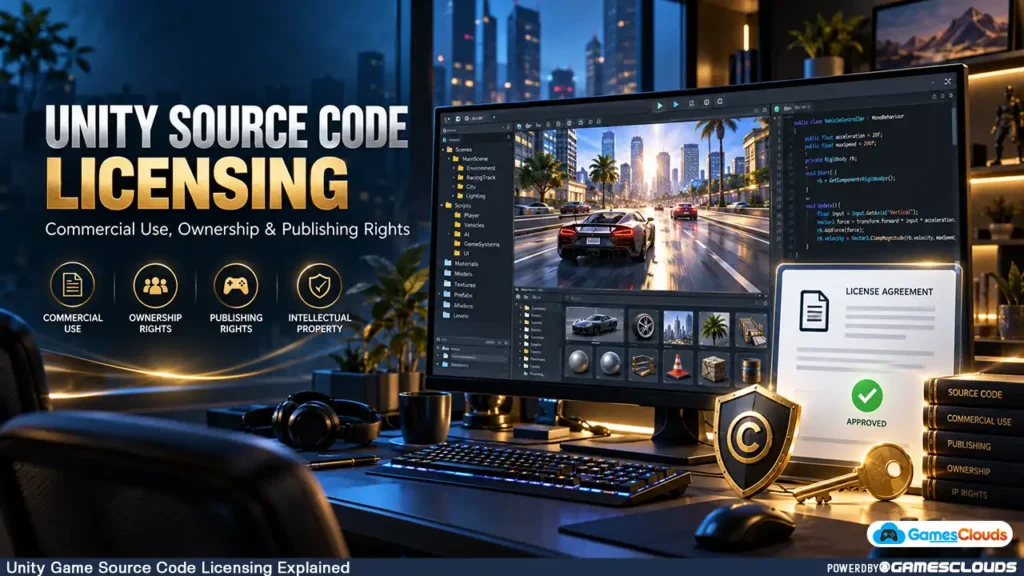
The project includes vehicles, environments, gameplay scripts, menus, sound effects, and everything needed to begin customization.
You spend several weeks creating new graphics, improving gameplay, and preparing the game for release.
But before publishing, an important question appears:
Do you actually have the legal rights to publish and monetize this game?
What happens if another developer purchases the same source code?
Can you sell the project to a client?
Can you release multiple games using the same template?
And does purchasing the source code mean you own its copyright?
These questions matter because buying a Unity project doesn’t automatically give you unlimited ownership or redistribution rights.
A source-code purchase normally provides permissions defined by a license agreement.
Understanding those permissions can help developers avoid unexpected restrictions, licensing disputes, and publishing problems.
In this guide, we’ll explain how Unity game source code license works, the differences between common license types, and what developers should verify before purchasing or commercially releasing a game.
This article provides general educational information, not legal advice. Actual rights depend on the applicable agreements, the content involved, and relevant law.
1. What Is a Unity Game Source Code License?
A Unity game source code license is an agreement that defines how a buyer may use a particular game project.
A typical Unity source-code package may include C# scripts, Unity scenes, prefabs, 3D models, textures, user interfaces, and other development assets.
Purchasing the package gives you access to those materials.
However, access and ownership are different concepts.
Source Code Access vs. Copyright Ownership
Suppose you purchase a Unity driving simulator.
The license may allow you to modify its gameplay, replace its graphics, and publish a commercial game.
But that doesn’t necessarily mean you own the copyright in the original source code.
The original creator may retain ownership while granting you permission to use the project under specified conditions.
This distinction is especially important when a developer intends to resell, redistribute, or transfer the project.
Why License Terms Matter
A license determines which activities are permitted and which require additional authorization.
For example, an agreement may allow commercial publishing while prohibiting the resale of the original source files.
Always read the applicable license before beginning substantial development work.
2. Understand the Different Types of Game Source Code Licenses
Not every Unity project uses the same licensing model.
The names and permissions vary between sellers, so the actual contract matters more than the label.
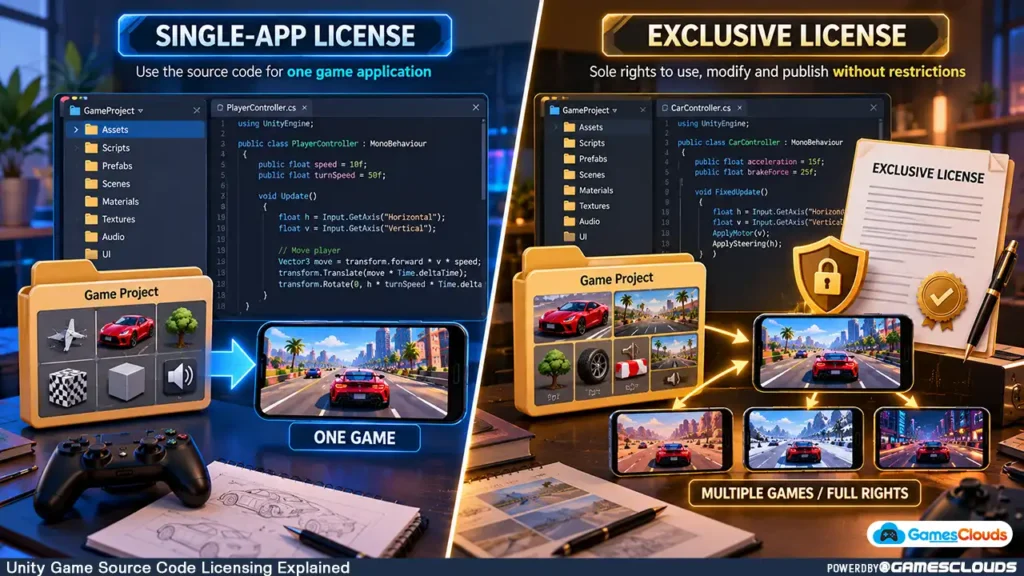
Single-App License
A single-app license generally limits use of the purchased project to one application or project.
Depending on its terms, the buyer may be allowed to customize and commercially publish that application.
However, creating additional games from the same source code may require additional licenses.
Multi-App License
Some sellers offer licenses that permit multiple projects or applications.
These may include restrictions on the number of applications, development teams, or permitted distribution methods.
A multi-app license should not automatically be interpreted as permission to resell the source code itself.
Exclusive License
An exclusive license may restrict the seller from granting certain rights to other parties.
However, exclusivity can be limited by platform, territory, duration, or particular rights.
An exclusive license also doesn’t automatically transfer copyright ownership.
If exclusive rights are important, the agreement should clearly define their scope and address existing licenses.
Custom Licensing Agreement
Some projects require individually negotiated terms.
This is particularly relevant when a studio commissions custom game development or requests exclusive commercial rights.
A custom agreement can define source-code ownership, permitted reuse, deliverables, and future development rights.
3. How GamesClouds Single-App Licensing Works
At GamesClouds, the published Single App License Agreement provides an example of how a marketplace license can work.
According to the current agreement, buyers receive a non-exclusive, non-transferable license for one project or application, unless different terms apply.
The agreement permits modification, commercial use, and distribution of the finished project in compiled form.
However, it restricts redistribution, resale, and sharing of the original source files. GamesClouds
What Can Buyers Generally Do?
Under the published single-app terms, permitted activities include modifying the purchased project, developing a commercial application, and monetizing the finished game.
For example, a developer could purchase a suitable racing game template, create original environments, improve gameplay, and publish the resulting application.
What Is Restricted?
The agreement prohibits selling or sharing the purchased source code as a standalone product.
It also prohibits transferring the license and claiming ownership of the original source files.
Importantly, the agreement identifies the vendor as the owner of the underlying intellectual property.
Developers should review the complete GamesClouds Single App License Agreement and any product-specific terms before purchasing.
If you intend to use one project for several separate applications, clarify the licensing requirements beforehand.
4. Can You Publish a Game Using Purchased Unity Source Code?
In many cases, yes.
Commercial publishing is a common reason developers purchase ready-made game templates.
However, publishing rights depend on the source-code license and any separate third-party asset licenses.
Publishing on Android and iOS
Suppose you purchase a mobile racing game template.
You replace its vehicles, redesign the interface, create new levels, and prepare Android and iOS versions.
Before release, confirm that your license covers the intended applications and platforms.
A license allowing one application may not explicitly explain whether Android and iOS editions count as one project or separate applications.
If the wording is unclear, request written clarification.
Publishing on PC and Steam
The same principle applies to PC releases.
A Unity project may technically support Windows builds, but technical compatibility doesn’t establish distribution rights.
Verify that the license permits your intended commercial release.
You must also comply with the applicable store’s technical, content, and intellectual-property requirements.
Important: Permission to publish a game does not guarantee approval by any particular storefront.
5. Can You Resell Purchased Unity Game Source Code?
This is one of the most important licensing questions.
Permission to publish a finished game is not the same as permission to resell its source code.
For example, a developer might purchase a Unity shooting game and customize it extensively.
The license may permit commercial distribution of the resulting executable.
But it may still prohibit distributing the original project’s source files.
Why Source-Code Resale Is Different
When publishing a compiled game, customers normally receive an executable application.
When selling source code, customers receive editable files that may contain copyrighted scripts, models, textures, and other assets.
Those files can have separate redistribution restrictions.
What About Modified Source Code?
Changing a project’s graphics or scripts doesn’t automatically eliminate the original creator’s rights.
If the modified project still contains licensed original code or assets, redistributing it may require additional permission.
Before selling a modified source-code package, confirm that you have the necessary rights for every component.
6. Understand Third-Party Unity Asset Licenses
A Unity project may contain content from multiple creators.
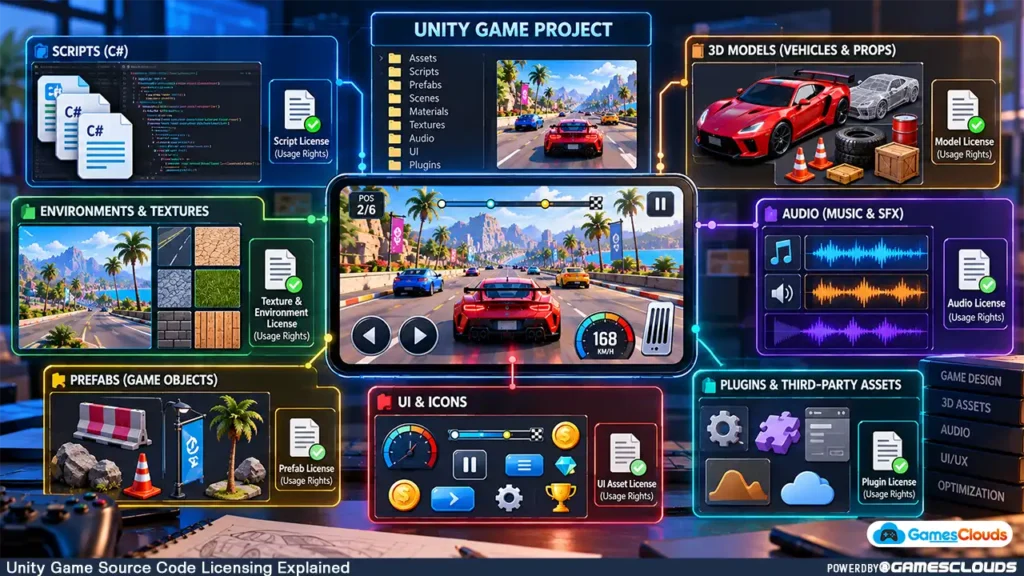
For example, a racing game could use an original vehicle controller, licensed car models, third-party sound effects, and an advertising SDK.
Each component may be subject to different terms.
Unity Asset Store Licensing
The Unity Asset Store Terms and EULA generally allow appropriately licensed assets to be incorporated into qualifying finished products, subject to their conditions.
However, the standard license restricts distributing assets outside the permitted uses.
Certain assets also carry non-standard or restricted licenses. Unity Asset Store
Why This Matters for Source-Code Buyers
Suppose a purchased Unity project contains a paid character model obtained through a third-party Asset Store license.
The source-code seller may have permission to use that model in their own finished game.
That doesn’t automatically establish permission to redistribute the editable model to another developer.
Before purchasing, ask whether all included assets are properly licensed for the intended delivery and use.
Review Plugins and SDKs
Third-party SDKs may have additional conditions.
Some require individual accounts, API keys, subscriptions, or separate licenses.
A project can be technically complete while still requiring additional authorization or configuration.
7. Can You Use Purchased Source Code for Client Projects?
Freelancers and development studios frequently use existing technical foundations to reduce repetitive development work.
However, client projects introduce additional licensing considerations.
Development Work vs. License Transfer
Imagine a client hires you to develop a custom driving game.
You purchase a licensed Unity template, modify its graphics, add features, and prepare the finished application.
The license may permit this type of client-based development.
But delivering the complete editable project to the client could involve sharing or transferring licensed source files.
Those actions may be restricted.
Define the Deliverables
Before accepting the project, establish whether the client expects a compiled game, editable Unity project, exclusive source code, or full intellectual-property ownership.
These are different deliverables.
A non-transferable license should not be treated as permission to assign the original source-code rights to a client.
If the client requires editable files, obtain appropriate authorization or arrange a suitable license for the receiving party.
Avoid Unclear Ownership Promises
Don’t promise that a client will own all project code if the game contains components licensed from other creators.
Instead, distinguish between newly created work and pre-existing licensed materials.
This distinction should appear in the development agreement.
8. What Happens If Multiple Developers Buy the Same Template?
Many game templates are sold under non-exclusive licenses.
This means different developers may legally obtain permission to use the same underlying project.
For example, several developers might purchase the same basic vehicle-controller system.
Each could then build a different game around it.
Shared Mechanics Don’t Automatically Mean Shared Ownership
Game mechanics and implementation are not identical concepts.
Two games may feature driving, shooting, inventory management, or other similar mechanics while using different original content and code.
However, copying protected expression, artwork, audio, branding, or proprietary code without authorization can create legal problems.
Make Your Game Distinctive
A purchased template should be treated as a development foundation.
Consider adding original gameplay content, different progression systems, improved controls, unique environments, and a consistent visual identity.
Google Play’s repetitive-content policy prohibits apps that merely provide substantially similar experiences without meaningful additional value. Google Help
Developers planning an Android release can also read our Unity Game Reskinning Guide for a practical customization workflow.
9. Exclusive Rights vs. Full Source Code Ownership
Some clients request exclusive rights because they don’t want competitors using the same project.
However, an exclusive license and a copyright assignment are different arrangements.

Exclusive Commercial License
An exclusive license may prevent the licensor from granting the specified rights to others within an agreed scope.
Its effectiveness depends on the agreement and the rights the licensor actually controls.
Copyright Assignment
A copyright assignment transfers specified ownership rights, subject to applicable legal requirements.
If full ownership is required, the contract should explicitly identify the rights being assigned.
Check Existing Third-Party Rights
A developer cannot transfer ownership of third-party assets merely because those assets are included in a Unity project.
Likewise, a seller’s promise of exclusivity may not eliminate rights already granted to previous licensees.
For substantial commercial projects, have a qualified legal professional review the proposed agreement.
10. Review Licensing Before Adding Monetization
Commercial monetization may involve advertising, in-app purchases, premium sales, or downloadable content.
Before integrating these systems, confirm that the license permits the intended commercial activity.
Advertising and In-App Purchases
A license may allow the finished game to generate revenue through advertisements or purchases.
However, advertising SDKs, payment integrations, and platform services have their own requirements.
Check the applicable terms and account responsibilities.
Premium PC Games
If you intend to sell a game on a PC storefront, verify that commercial distribution is permitted.
Also confirm whether any included assets have additional restrictions.
Downloadable Content and Additional Games
Adding content to an existing application may be treated differently from releasing a separate application.
The distinction depends on the agreement.
Don’t assume that permission to publish one game automatically covers unlimited sequels, spin-offs, or separately distributed titles.
11. Verify Intellectual Property Before Publishing
Licensing problems can arise even when a Unity project builds successfully.
For example, a game might contain unauthorized music, recognizable copyrighted characters, or branding associated with another company.
These issues should be resolved before release.
Review Your Game Assets
Check character models, environments, textures, audio, logos, fonts, and promotional graphics.
Make sure the project contains original content or appropriately licensed materials.
Follow Store Policies
Google Play’s Intellectual Property Policy prohibits applications that infringe intellectual-property rights.
The policy covers copyright, trademarks, patents, and other protected rights. Google Help
A source-code license doesn’t override these requirements.
Keep Licensing Records
Maintain copies of purchase receipts, license agreements, asset permissions, and relevant written authorizations.
These records can help document your rights if questions arise later.
12. Questions to Ask Before Purchasing Unity Source Code
Before buying a Unity game template, review the following areas.
| Licensing Question | Why It Matters |
|---|---|
| Is commercial publishing permitted? | Establishes whether the project can be monetized |
| How many applications are allowed? | Clarifies single-app or multi-app restrictions |
| Are Android, iOS, and PC releases covered? | Helps avoid platform-related ambiguity |
| Can the source code be modified? | Determines permitted customization |
| Can editable files be delivered to a client? | Important for freelance and studio projects |
| Are third-party assets included legally? | Identifies potential licensing risks |
| Can the source code be redistributed? | Clarifies resale restrictions |
| Is the license exclusive or non-exclusive? | Determines whether others may receive similar rights |
| Are updates or support included? | Helps plan ongoing maintenance |
| What happens if the seller removes the product? | Clarifies continuing rights and access |
Don’t rely exclusively on screenshots or promotional descriptions.
Read the agreement and request written clarification for important unanswered questions.
A Practical Purchase Example
Consider a developer planning a mobile supermarket simulator.
The developer wants to buy a Unity template, create new store environments, replace product models, add a progression system, and publish the finished game.
Before purchasing, the developer should verify commercial publishing rights, the number of permitted applications, third-party asset licenses, and whether the project supports the required customization.
If the developer later plans to sell the editable source code, that should be treated as a separate licensing question.
This approach helps align the purchase with the actual business plan.
Common Unity Source Code Licensing Mistakes
One common mistake is assuming that paying for source code automatically transfers copyright ownership.
Another is confusing commercial publishing rights with permission to redistribute editable project files.
Developers may also overlook third-party assets and SDKs that carry separate licenses.
Client projects create additional risks when a freelancer promises full ownership without checking whether the original code can be transferred.
Finally, purchasing a template without reading its restrictions can lead to unexpected limitations when expanding into additional applications or platforms.
The best approach is to clarify important rights before purchasing, modifying, or distributing the project.
Unity Source Code Licensing: Final Checklist
Before using purchased Unity source code commercially, confirm that:
- The seller has authority to license the relevant content.
- The agreement permits your intended commercial use.
- The number of applications and permitted platforms are clear.
- Third-party assets and SDKs are appropriately licensed.
- Client delivery and source-code transfer rights are understood.
- Any exclusivity or ownership requirements are documented.
- The finished game complies with the intended storefront’s policies.
- Copies of licenses, receipts, and permissions are retained.
Conclusion
Purchasing Unity game source code can provide a practical foundation for developing commercial games.
However, understanding the license is just as important as evaluating the project’s gameplay, graphics, and technical quality.
A single-app license, multi-app license, exclusive agreement, and copyright assignment can provide substantially different rights.
Before purchasing, confirm what you can modify, publish, monetize, share, or transfer.
Also review third-party assets, client-delivery requirements, and the policies of your intended publishing platforms.
The goal is to build a commercially useful game on a technical foundation you are properly authorized to use.
At GamesClouds, developers can explore Unity game source codes and templates for mobile, PC, and other platforms.
For projects requiring customization, development, reskinning, or publishing assistance, explore our game development services.
Frequently Asked Questions
1. Can I commercially publish a game made from purchased Unity source code?
Yes, if the applicable license permits commercial distribution and you have the necessary rights to the included assets. The finished game must also comply with the policies of its publishing platform.
2. Does purchasing Unity source code mean I own the copyright?
Not necessarily. A purchase commonly grants a license to use the project. Copyright ownership remains with the original rights holder unless the relevant rights are validly transferred.
3. Can I sell modified Unity source code to another developer?
Only if the applicable agreements authorize that redistribution. Modifying graphics or scripts doesn’t automatically grant permission to resell the original licensed components.
4. Can I use one Unity game template for multiple games?
It depends on the license. A single-app license may restrict use to one application, while another agreement may allow multiple projects. Check the terms before creating additional releases.
5. Can I give purchased Unity source code to my client?
Only if the license permits the intended sharing or transfer. A license allowing client-based development doesn’t necessarily authorize transferring the original source files or assigning their copyright.
[…] For more information, read our Unity game source code licensing guide. […]