

How to Add AdMob Rewarded Ads Unity (2026 Guide)
Imagine developing a mobile racing game where players can unlock vehicles, complete missions, and earn coins to uses of admob redwarded ad unity monetization.
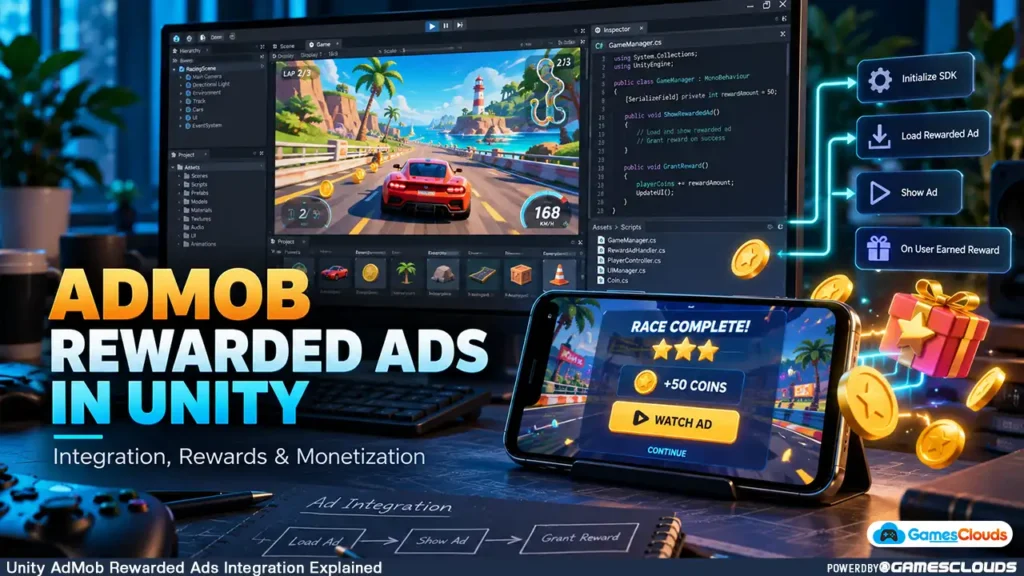
The gameplay works well, the graphics look polished, and the progression system gives players reasons to continue playing.
Now you want to monetize the game without interrupting every race with advertisements.
One practical option is rewarded advertising.
Instead of forcing players to watch ads unexpectedly, you can offer optional rewards such as extra coins, additional lives, or temporary gameplay bonuses.
Players choose whether the reward is worth watching an advertisement.
However, implementing rewarded ads correctly involves more than placing a Watch Ad button inside the game.
You need to configure an advertising SDK, load ads reliably, handle completion callbacks, protect the reward system, and test the experience across different devices.
In this guide, we’ll explain how to add AdMob rewarded ads in Unity, choose appropriate reward placements, and avoid common technical and monetization mistakes.
The goal is to create an advertising system that supports your game’s economy without unnecessarily disrupting gameplay.
1. What Are Rewarded Ads in Unity Games?
AdMob Rewarded Ads Unity is Rewarded ads are advertisements that players voluntarily interact with in exchange for a defined in-game benefit.
For example, a player might choose to watch an advertisement to receive additional coins after completing a level.
Another game might offer an extra life, a temporary power-up, or additional resources.
Unlike conventional interstitial advertisements, standard rewarded ads require the player to choose the advertising opportunity.
How Rewarded Advertising Works
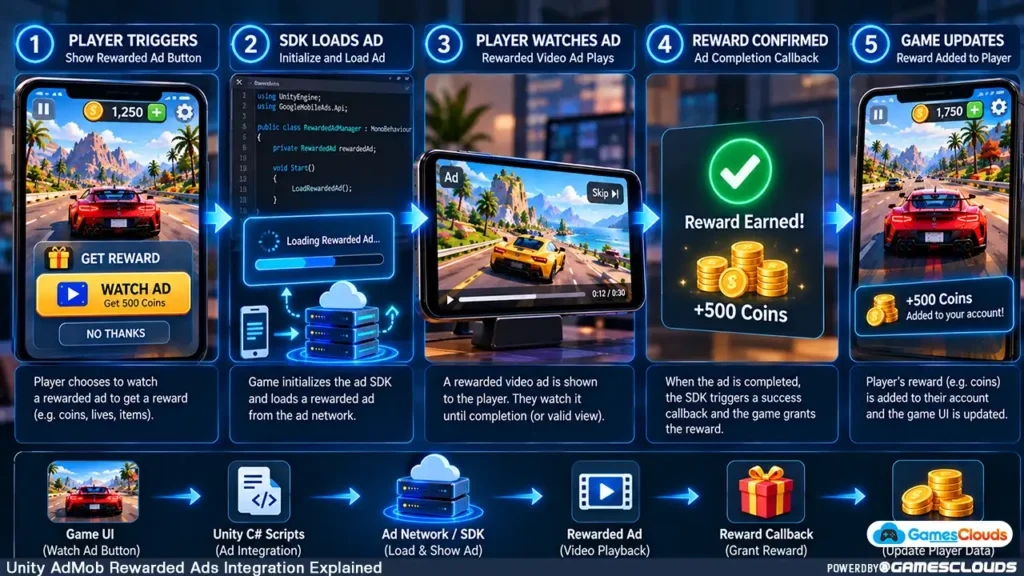
AdMob Rewarded Ads Unity A typical rewarded-ad interaction follows this sequence:
- The game presents an optional reward.
- The player selects the Watch Ad button.
- The advertising SDK displays an available advertisement.
- The player completes the required interaction.
- The SDK reports that the reward has been earned.
- The game grants the corresponding reward.
The important distinction is that the game should award the benefit only after receiving the appropriate reward confirmation.
Simply opening or closing an advertisement doesn’t necessarily mean the player earned the reward.
Google’s official rewarded-ad documentation describes the loading, showing, reward callback, and cleanup process for Unity applications. Google for Developers
2. Why Rewarded Ads Can Work Well in Mobile Games
Rewarded advertising provides developers with a way to monetize optional player actions.
Its suitability depends on the game genre, economy, audience, and implementation.

Players Receive a Clear Benefit
A rewarded advertisement should offer something understandable.
For example, a racing game could provide additional coins after a completed race.
A puzzle game might offer an optional hint.
A simulation game could provide a temporary resource bonus.
Players should know what they will receive before selecting the advertisement.
Developers Can Monetize Optional Engagement
Advertising revenue generally depends on factors such as eligible impressions, advertiser demand, geography, and the advertising platform.
Rewarded ads create additional monetization opportunities when players voluntarily use them.
However, adding rewarded ads doesn’t guarantee higher revenue or better retention.
Poorly balanced rewards can damage the game economy or make ordinary progression feel unnecessarily difficult.
The Game Remains Playable
A well-designed rewarded-ad system should not make optional advertisements feel mandatory.
Players who decline an ad should still have a reasonable path through the game’s intended progression.
This is particularly important for casual games, where unnecessary interruptions can make short gameplay sessions frustrating.
3. Set Up Google AdMob for Your Unity Project
Before integrating rewarded advertisements, prepare the advertising account and Unity project.
Create Your AdMob Application
Begin by creating or accessing your Google AdMob account.
Register the Android or iOS application according to the platform’s setup requirements.
AdMob uses different identifiers for applications and individual advertising placements.
The App ID identifies the application within AdMob.
The Ad Unit ID identifies a particular advertising placement.
These identifiers serve different purposes and shouldn’t be confused.
Create a Rewarded Ad Unit
Inside AdMob, create an ad unit using the rewarded format.
Assign a recognizable name based on its intended placement.
For example:
Rewarded_Level_Continue
Rewarded_Double_Coins
Rewarded_Free_Gems
Clear naming helps developers manage placements and troubleshoot problems later.
The examples above are organizational names, not actual AdMob ad unit IDs.
Prepare the Unity Project
Before installing the advertising plugin, create a backup or version-control checkpoint.
Check the project’s Unity version, Android or iOS configuration, and existing third-party packages.
This is especially important when working with a purchased Unity game template that may already contain advertising dependencies.
4. Install the Google Mobile Ads Unity Plugin
Google provides a Unity plugin that allows developers to integrate mobile advertisements using C#.
The plugin supports Android and iOS applications.
Install the Plugin
Google’s current documentation describes several installation methods, including OpenUPM and importing a Unity package from the official repository.
For example, developers using OpenUPM CLI can install the package with:
openupm add com.google.ads.mobileThe appropriate installation method depends on the project’s existing package-management workflow.
After installation, check for compilation errors and dependency conflicts.
Configure the Application IDs
Inside Unity, open:
Assets → Google Mobile Ads → Settings
Enter the appropriate Android and iOS AdMob App IDs.
These settings allow the plugin to identify the relevant application.
Google’s setup documentation also describes platform requirements and dependency-management considerations. Google for Developers
Initialize the Advertising SDK
Before requesting advertisements, initialize the Google Mobile Ads SDK.
The initialization method is:
MobileAds.Initialize()
Initialization generally occurs once during application startup.
However, developers must account for applicable consent and privacy requirements before initializing or requesting ads, because SDK initialization may trigger advertising-related activity.
5. Load Rewarded Ads Before Players Need Them
An advertisement must be available before it can be displayed.
Waiting until the player presses Watch Ad before beginning the loading process may introduce an unnecessary delay.
A more responsive approach is to prepare the ad before the player reaches the reward opportunity.
Understand the Loading Process
The Google Mobile Ads Unity plugin provides the RewardedAd.Load() method.
The loading request returns either an available advertisement or information indicating that the request failed.
Your game should handle both outcomes.
Example: Racing Game Reward Screen
Imagine a player completing a race.
The results screen contains two options:
Claim 100 Coins
Watch Ad to Double Coins
The game can begin preparing the rewarded advertisement before the results screen appears.
If the advertisement loads successfully, the optional reward button becomes available.
If loading fails, the player can still claim the normal reward.
Handle Failed Ad Requests
Advertisements may fail to load because of connectivity problems, unavailable inventory, configuration errors, or other conditions.
Avoid repeatedly requesting ads without delay.
Google discourages uncontrolled immediate retries after loading failures.
Use a controlled retry strategy and keep the gameplay functional when advertisements are unavailable. Google for Developers
6. Show the Advertisement and Handle Reward Callbacks
After successfully loading an advertisement, the next step is displaying it when the player chooses the reward.
Verify That the Ad Is Ready
The Unity plugin provides CanShowAd() to check whether the loaded advertisement can be displayed.
The game should perform this check before attempting to show it.
If the ad isn’t ready, display a short message or keep the reward button unavailable.
Display the Advertisement
The RewardedAd.Show() method displays the advertisement and accepts a reward callback.
That callback is the appropriate place to begin processing the earned reward.
For example, a game might use the callback to grant additional coins.
Avoid Rewarding Players Too Early
Don’t grant rewards when the player merely presses the Watch Ad button.
Likewise, don’t automatically grant the reward whenever the advertisement closes.
The reward should depend on the SDK’s reward-earned callback or the appropriate verified reward result.
For games with valuable persistent currencies, developers should also consider server-side verification.
Prevent Duplicate Rewards
A robust implementation should prevent the same reward event from being processed multiple times.
For example, if a player earns 200 coins from one advertisement, the reward system shouldn’t accidentally grant the coins twice.
Track the relevant reward state and make reward processing idempotent where appropriate.
7. Clean Up Advertisements and Prepare the Next One
Rewarded advertisements are not reusable indefinitely.
According to Google’s current Unity documentation, each loaded rewarded-ad object can be shown once.
After the advertisement has been used, the game must prepare another object for the next opportunity.
Manage the Ad Lifecycle
The advertising system should handle events such as:
- Advertisement loaded.
- Advertisement opened.
- Reward earned.
- Advertisement closed.
- Advertisement failed to display.
After the advertisement is no longer needed, call the appropriate cleanup method.
The plugin provides Destroy() for disposing of rewarded-ad objects.
Preload the Next Advertisement
After an advertisement closes or fails to display, the game can prepare the next rewarded ad.
This helps reduce waiting time when another reward opportunity becomes available.
Google also notes that loaded ads expire after approximately one hour, so developers should avoid relying on indefinitely cached ad objects. Google for Developers
Handle Unity Threading Correctly
Some advertising callbacks can occur outside Unity’s main thread.
If a callback modifies GameObjects, UI elements, or other UnityEngine objects, schedule that work on Unity’s main thread.
Google documents MobileAdsEventExecutor.ExecuteInUpdate() for this purpose. Google for Developers
This is an important implementation detail that can prevent difficult-to-diagnose runtime problems.
8. Choose Rewarded Ad Placements That Fit Your Game
Technical integration is only part of the process.
Reward placement determines how naturally advertisements fit into the player’s experience.
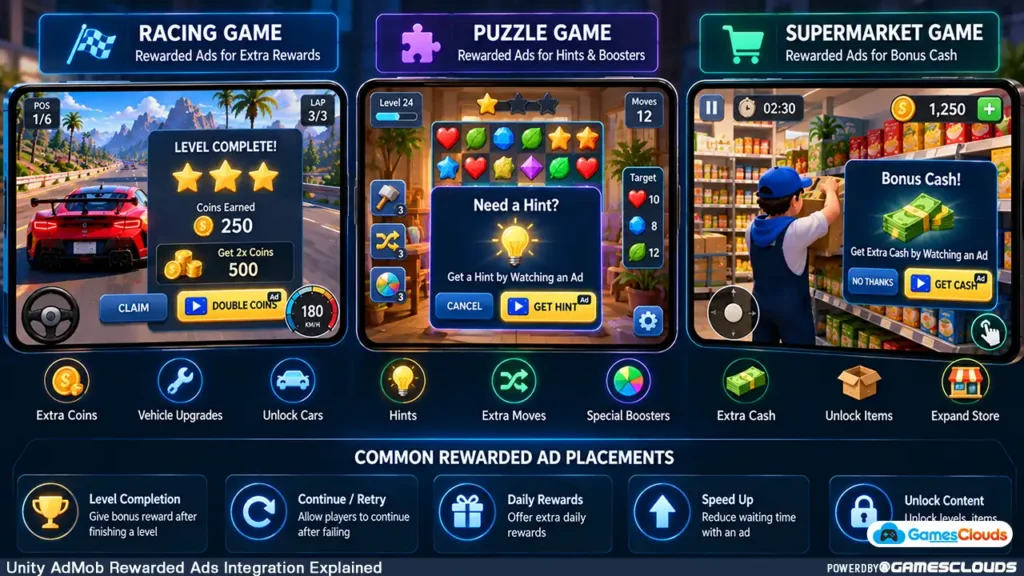
Racing and Driving Games
A racing game might offer additional coins after completing a race.
Another option could be a temporary bonus for the next event.
Avoid displaying advertisements while the player is actively controlling a vehicle.
Puzzle Games
Puzzle games can offer optional hints or additional moves.
However, the normal difficulty should remain reasonably balanced.
Players shouldn’t feel that purchasing or watching advertisements is the only practical way to progress.
Simulation Games
Simulation games provide several possible reward opportunities.
For example, a shop-management game could offer a temporary earnings bonus or additional in-game currency.
A resource-management game might offer optional materials.
The reward should connect naturally to the existing progression system.
Action Games
An action game might offer a limited continue opportunity after failure.
For example, a player could watch an advertisement to retry from a checkpoint.
The reward should be clearly explained before the advertisement begins.
9. Balance Rewards With Your Game Economy
Rewarded ads should complement the game’s economy rather than undermine it.
Consider a game where players normally earn 100 coins after completing a level.
Offering 100 additional coins through a rewarded advertisement might be reasonable for a particular progression system.
However, giving away 10,000 coins for every advertisement could make ordinary gameplay rewards irrelevant.
Evaluate Reward Value
Ask whether the reward is useful, whether it affects progression fairly, and whether it creates unintended shortcuts.
For example, a game with purchasable character skins needs to consider how advertising rewards interact with those prices.
Avoid Excessive Reward Opportunities
More rewarded-ad buttons don’t automatically create a better monetization system.
If every menu contains several advertising prompts, the interface may become distracting.
Start with a few meaningful placements.
Evaluate how players interact with them before adding more.
Track Meaningful Metrics
Useful measurements include rewarded-ad availability, opt-in rate, completed reward events, player retention, and advertising revenue.
Interpret these metrics together.
An increase in advertising impressions may not be beneficial if it coincides with a substantial decline in player engagement.
10. Follow Google Play Advertising Policies
Advertising integration must comply with the policies of the intended publishing platform.
Google Play’s developer policies distinguish explicitly opted-in rewarded ads from certain unexpected or disruptive full-screen advertising experiences.
The current policy document took effect on September 30, 2026, unless otherwise specified. Google Help
Make Rewarded Ads Clearly Optional
Players should understand that selecting a particular button will display an advertisement.
For example:
Watch Ad — Get 200 Coins
This communicates the action and reward more clearly than an ambiguous button.
Avoid Misleading Interactions
Don’t disguise advertising buttons as ordinary gameplay controls.
Don’t force an advertisement unexpectedly when a player selects a normal menu option.
Rewarded advertising should be presented transparently.
Consider Children’s Advertising Requirements
Games directed toward children or mixed-age audiences may have additional advertising restrictions.
Developers must review the applicable Google Play Families requirements and advertising SDK obligations.
The general rules for adult audiences shouldn’t automatically be applied to children’s games.
11. Handle Privacy and Consent Requirements
Advertising SDKs can process information relevant to privacy and data-protection obligations.
Depending on the user’s location, applicable regulations, and advertising configuration, developers may need to present privacy information or obtain consent.
Use Google’s User Messaging Platform
Google provides the User Messaging Platform SDK to help manage privacy messages and consent choices.
The Unity implementation includes methods for updating consent information and checking whether advertising requests are permitted.
For example, ConsentInformation.CanRequestAds() helps determine whether ads can be requested under the current consent state.
Developers should review the official Unity UMP SDK documentation before implementing advertising requests. Google for Developers
Review Store Disclosures
Before publishing, verify the game’s privacy policy, advertising disclosures, and applicable Google Play Data Safety information.
These requirements should be reviewed alongside the actual SDKs and data practices used by the application.
12. Test Rewarded Ads Before Publishing
Testing is essential because advertising systems depend on external services, network connectivity, and asynchronous callbacks.
Always Use Test Advertisements
Google provides dedicated test ad unit IDs.
For Android rewarded ads, the official sample ID is:
ca-app-pub-3940256099942544/5224354917
For iOS rewarded ads, the sample ID is:
ca-app-pub-3940256099942544/1712485313
These identifiers are intended for development testing.
Replace them with your own production ad unit IDs before publishing.
Google warns that improperly testing live advertisements can create invalid-activity risks. Google for Developers
Test Important Scenarios
A complete testing process should include successful ad loading, failed loading, reward completion, ad dismissal, and temporary internet disconnection.
Also verify that the game doesn’t grant duplicate rewards.
Test what happens when the application is backgrounded during an advertisement.
Verify Real Devices
Unity Editor testing is useful, but final verification should take place on supported Android or iOS devices.
Different devices and network conditions may expose issues that aren’t visible during Editor testing.
Common AdMob Rewarded Ads Mistakes to Avoid
One common mistake is using production advertising IDs during development.
Another is granting rewards before the SDK confirms that the player earned them.
Developers may also forget to destroy used ad objects, reload advertisements, or handle failed requests.
Incorrect App IDs and Ad Unit IDs can create configuration problems.
Other mistakes include ignoring consent requirements, accessing Unity objects from inappropriate callback threads, and offering rewards that damage game balance.
Finally, avoid assuming that successfully displaying an advertisement means the entire monetization system is ready.
The reward process, user experience, privacy handling, and game economy must also be tested.
Practical Unity Rewarded Ads Integration Workflow
| Development Stage | Main Objective |
|---|---|
| 1. AdMob Setup | Register the application and create rewarded ad units |
| 2. Unity Preparation | Check Unity version and existing dependencies |
| 3. SDK Installation | Install and configure Google Mobile Ads |
| 4. Privacy Setup | Handle applicable consent requirements |
| 5. Initialization | Initialize the advertising SDK |
| 6. Ad Loading | Request and prepare rewarded advertisements |
| 7. Reward Logic | Grant rewards after valid confirmation |
| 8. Lifecycle Management | Handle failures, cleanup, and reloading |
| 9. Economy Balancing | Choose appropriate rewards and placements |
| 10. Testing | Verify advertisements on supported devices |
| 11. Publishing | Replace test IDs and review store compliance |
Conclusion
Rewarded advertising can be a useful monetization feature for Unity mobile games when implemented carefully.
The technical process involves configuring AdMob, installing the Google Mobile Ads plugin, loading advertisements, handling reward callbacks, and managing the ad lifecycle.
However, successful implementation also requires thoughtful game design.
Rewards should be valuable without damaging progression.
Advertising opportunities should remain understandable and optional.
Privacy requirements, platform policies, and real-device testing should be addressed before release.
The objective isn’t simply to display more advertisements. It’s to create a reliable reward system that fits naturally into the game.
At GamesClouds, developers can explore editable Unity game projects that provide foundations for customization and further development.
For example, the Real Car Parking Unity Source Code and Digging A Hole Quest Unity Source Code are examples of projects where developers could consider adding suitable monetization systems.
Advertising availability and implementation requirements should be checked individually for each project.
Explore our Unity game source codes or game development and customization services for additional project options.
Frequently Asked Questions
1. How do I add AdMob rewarded ads in Unity?
Install the Google Mobile Ads Unity plugin, configure your AdMob App ID, initialize the SDK, and load a rewarded advertisement. When the player chooses to watch the ad, verify that it is available and display it. Grant the reward through the appropriate callback.
2. Are rewarded ads better than interstitial ads?
Neither format is universally better. Rewarded ads allow players to opt into an advertisement for a defined benefit, while interstitial ads are generally placed at appropriate transitions. The best choice depends on gameplay, audience, and monetization strategy.
3. Why are AdMob rewarded ads not showing in Unity?
Possible causes include incorrect identifiers, SDK configuration problems, unavailable advertising inventory, network issues, consent restrictions, or failed loading requests. Start troubleshooting with official test ad units and inspect the SDK’s error information.
4. Can I add rewarded ads to purchased Unity game source code?
Usually, yes, when the project is technically compatible and the applicable license permits modification. However, integration requirements depend on the Unity version, existing plugins, gameplay architecture, and advertising configuration.
5. Can rewarded ads increase mobile game revenue?
They can create additional advertising revenue opportunities, but results vary. Player activity, geographic distribution, advertising demand, reward design, and user experience all influence outcomes. No particular revenue increase is guaranteed.
[…] For a dedicated implementation guide, see our AdMob rewarded ads Unity tutorial. […]