Google Play Store Listing A/B Testing Guide
Imagine spending several weeks customizing a Unity racing game.
You’ve redesigned the vehicles, improved the environments, added new challenges, and prepared professional store graphics.
The game is finally available on Google Play.
But after reviewing its store performance, you begin questioning your presentation.
Is the application icon attractive enough?
Do the screenshots communicate the gameplay clearly?
Would a different feature graphic encourage more players to explore the game?
Perhaps the first screenshot should show a dramatic racing moment instead of the main menu.
Or maybe the existing design is already more effective than the alternatives.
Without testing, these decisions are mostly assumptions.
That’s where Google Play store listing A/B testing becomes useful.
Google Play Console provides experiments that allow developers to compare different store listing assets and evaluate how users respond.
Instead of replacing your entire store presentation and hoping for better results, you can test specific changes and use the available data to guide your decisions.
In this guide, we’ll explain how store listing experiments work, which assets to test, how to prepare meaningful variations, and how to interpret the results.
The goal is to help indie developers make more informed publishing decisions while maintaining an accurate and appealing presentation of their games.
1. What Is Google Play Store Listing A/B Testing?
A/B testing is a method of comparing different versions of an element to understand how they perform.
For mobile games, the element might be an application icon, screenshot collection, feature graphic, or description.
Google Play Console includes a feature called Store Listing Experiments.
It allows developers to compare alternative listing assets against an existing version.
How Does an Experiment Work?
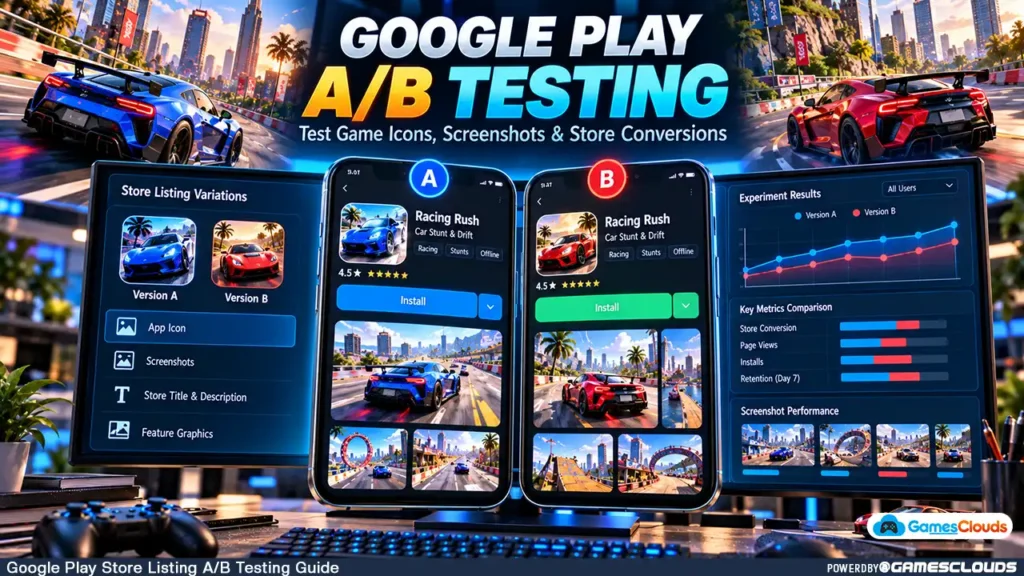
Suppose you’ve published a driving simulator.
Your current application icon displays a blue sports car.
You want to determine whether an alternative icon featuring a red sports car communicates the game’s appeal more effectively.
Instead of permanently replacing the original icon, you create an experiment.
The current icon becomes the control version.
The alternative becomes a test variant.
Eligible visitors are shown different versions according to the experiment configuration.
Google Play then collects relevant interaction data.
After sufficient evidence is available, the experiment can help you decide whether to keep the original or apply the alternative.
Google’s official Store Listing Experiments documentation explains the available experiment types and configuration options. Google Help
2. Why Store Listing Optimization Matters for Indie Games
Developers often concentrate on improving the actual game.
They refine controls, add levels, optimize performance, and fix technical problems.
These improvements are important, but potential players cannot evaluate most of them before installing.
Instead, they initially encounter promotional assets.
Your Icon Communicates the Game’s Identity
An application icon may appear in search results, recommendations, and other discovery surfaces.
It needs to communicate the game’s identity at a relatively small display size.
A racing game icon might emphasize a distinctive vehicle.
A puzzle game could highlight its central mechanic.
A simulator might feature the primary activity players will perform.
Screenshots Explain the Gameplay
Screenshots help users understand what happens inside the game.
For example, a parking simulator might show a difficult parking challenge, vehicle customization, and a city-driving environment.
Descriptions Set Expectations
The short description helps communicate the game’s purpose.
A clear description can help users decide whether the experience matches their interests.
However, store listing optimization doesn’t replace game quality.
If promotional graphics promise features that the game doesn’t provide, the resulting mismatch can damage player trust.
3. Which Google Play Assets Can You A/B Test?
Google Play supports different experiment types.
Understanding their scope is important before preparing alternatives.
Default Graphics Experiments
Default graphics experiments allow developers to test graphical assets associated with their default store listing language.
Supported assets include:
- Application icons.
- Feature graphics.
- Store screenshots.
These experiments are appropriate when comparing alternative visual presentations.
Localized Experiments
Localized experiments can test graphics and descriptions for selected languages.
For example, a developer could compare alternative English descriptions or evaluate localized screenshots for a particular market.
Google currently documents support for one default graphics experiment or up to five localized experiments running simultaneously for an application.
A single experiment can include up to two test variants in addition to the existing listing.
The exact available options depend on the listing and experiment configuration. Google Help
Can You Test Everything at Once?
Technically, some experiments can include multiple changed assets.
However, changing several elements simultaneously makes it difficult to determine which change influenced the outcome.
For most indie developers, testing one meaningful element at a time provides clearer information.
4. Start With Your Current Store Listing
Before creating an experiment, review the listing already available to players.
Evaluate the Existing Icon
Ask whether the icon clearly communicates the game’s genre.
Does the main subject remain recognizable at a small size?
Is the composition unnecessarily crowded?
Does the artwork accurately represent the game?
Review Your Screenshots
Look at the first three screenshots.
Do they show meaningful gameplay?
Are the main mechanics immediately understandable?
Do they demonstrate different features rather than repeating nearly identical scenes?
Examine the Short Description
Does the description explain what players actually do?
For example, consider this hypothetical description:
“Drive realistic cars through challenging parking missions and city environments.”
It communicates a clear activity without relying on exaggerated promotional claims.
Establish a Baseline
Record the current store listing configuration and relevant acquisition metrics.
Keep copies of the original assets.
This creates a reference point for comparing later experiments.
5. How to Create a Store Listing Experiment in Google Play Console
Once you have a clear testing objective, open Google Play Console.
Step 1: Open Store Listings
Select your published application.
Navigate to:
Grow users → Store presence → Store listings
Find the relevant listing and select the option to set up an experiment.
The interface may also provide an experiment setup option through the listing’s details page.
Step 2: Name Your Experiment
Choose a descriptive internal name.
For example:
Racing Game Icon Test – Red vs. Blue
The name should make the purpose clear when reviewing previous experiments.
Step 3: Select the Experiment Type
Choose the appropriate graphics or localized experiment.
The correct option depends on which assets and languages you intend to test.
Step 4: Select a Target Metric
Google Play Console currently provides target metrics including unique user install clicks, unique user open clicks, and unique user pre-registration clicks.
For an existing game’s acquisition-focused test, unique user install clicks may be a suitable choice.
Step 5: Configure the Variants
Upload your alternative assets.
For a simple icon experiment, keep the existing icon as the control and provide one alternative.
Step 6: Review Advanced Settings
Play Console provides options related to the experiment audience, minimum detectable effect, and confidence level.
Default settings may be appropriate when you’re unfamiliar with statistical testing.
Step 7: Submit the Experiment
Review the configuration and follow the publishing workflow to submit the experiment.
Google’s official setup instructions describe these steps and the current Play Console interface. Google Help
6. How to A/B Test Game Icons Effectively
An application icon should be recognizable and relevant to the gameplay.
However, developers sometimes confuse visual complexity with effectiveness.
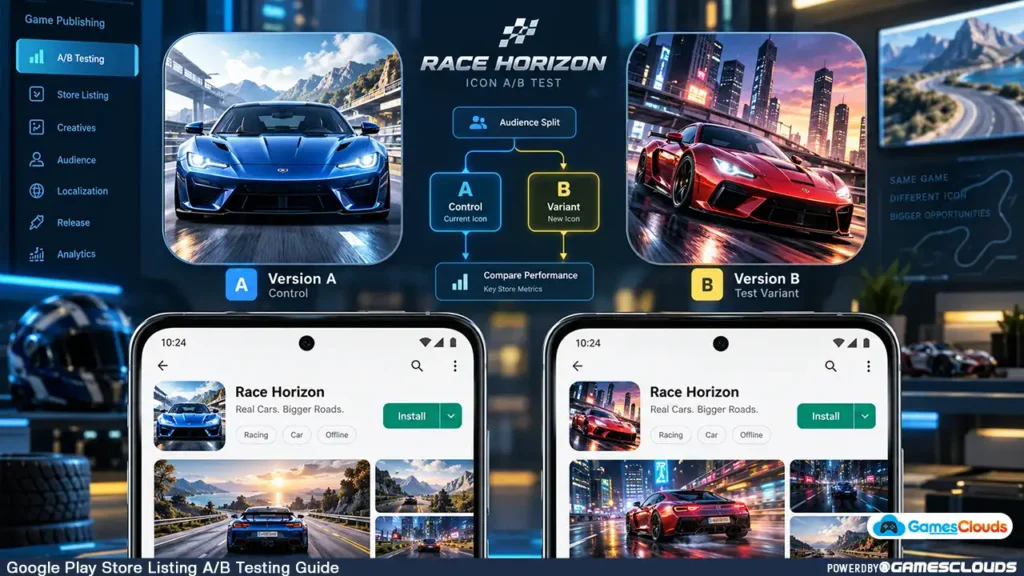
An icon containing numerous vehicles, characters, explosions, and text may look impressive at full resolution but become difficult to understand at smaller sizes.
Test a Meaningful Design Hypothesis
Consider a hypothetical car-parking game.
Version A: A blue sports car viewed from the front.
Version B: A red sports car shown from a dramatic three-quarter angle.
The hypothesis might be that a more dynamic vehicle angle communicates the driving experience more clearly.
Keep the Test Focused
If the objective is to compare vehicle presentation, avoid changing the entire branding system simultaneously.
A focused experiment makes the result easier to interpret.
Follow Google’s Icon Requirements
Google Play currently requires a 512 × 512-pixel store icon in 32-bit PNG format with alpha, subject to its file-size and design requirements.
Developers should also avoid misleading badges, rankings, and promotional claims.
Review the official Google Play graphic asset requirements before preparing final artwork. Google Help
7. How to Test Game Screenshots
Screenshots are particularly important for communicating gameplay.
A strong screenshot should help players understand what they can actually experience.
Show the Main Gameplay First
Imagine a bus-driving simulator.
The first screenshot might show the bus navigating a challenging city route.
The second could demonstrate a parking mission.
The third might highlight a different environment or gameplay mode.
This sequence communicates variety without relying on unrelated promotional imagery.
Test Screenshot Order
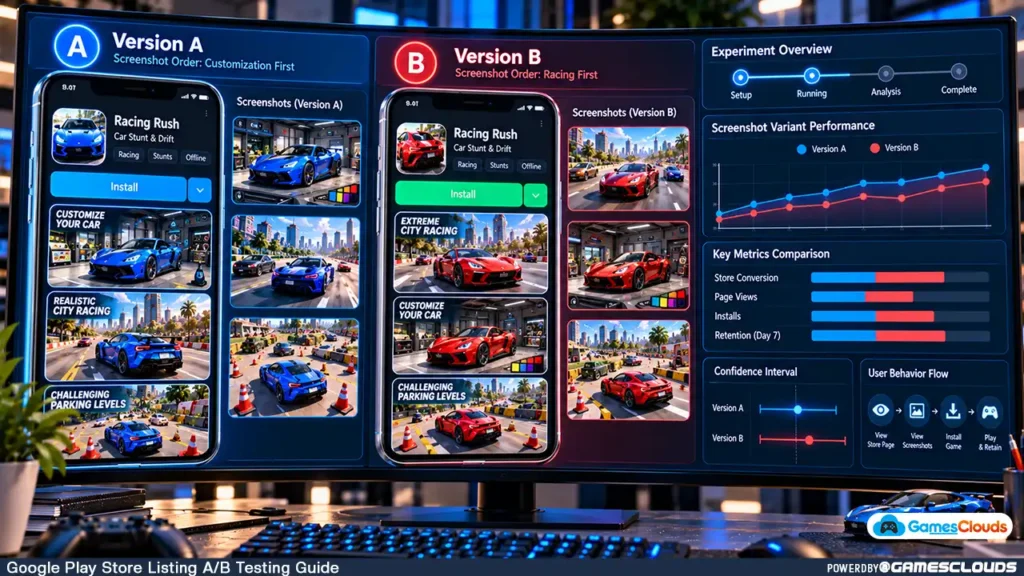
A useful experiment could compare two screenshot arrangements.
Version A: Parking challenge first, city driving second.
Version B: City driving first, parking challenge second.
The objective is to understand which presentation better communicates the game’s appeal.
Use Accurate Gameplay Images
Google recommends that game screenshots represent the actual experience.
For certain large-format promotional placements, its guidance specifies at least three landscape screenshots at 1920 × 1080 pixels or three portrait screenshots at 1080 × 1920 pixels.
These are promotional eligibility recommendations, distinct from the basic screenshot upload requirements.
Google also permits limited explanatory text overlays, provided the screenshots remain representative of the game.
For a complete explanation, consult the official screenshot guidelines. Google Help
8. Should You Test Your Feature Graphic?
The feature graphic is another important part of a game’s promotional presentation.
Google Play requires a feature graphic measuring 1024 × 500 pixels.
It may appear in promotional surfaces and serve as the cover image for a preview video.
Focus on the Game’s Core Experience
For a racing game, a feature graphic might emphasize an exciting driving scene.
For a simulation game, it could highlight the central activity.
Avoid Unnecessary Visual Clutter
A feature graphic doesn’t need to contain every gameplay feature.
Too many visual elements can reduce clarity, especially when the artwork is displayed at a smaller size.
Keep Branding Consistent
The icon, screenshots, and feature graphic should feel like parts of the same game.
However, they don’t need to repeat identical compositions.
Google’s asset guidance recommends using complementary visual styles while keeping the primary subject clear. Google Help
9. Understand Statistical Confidence Before Choosing a Winner
One of the biggest A/B testing mistakes is selecting a winner too early.
Suppose an alternative icon initially appears to perform better.
That doesn’t necessarily mean the improvement will remain after more users encounter the experiment.
Why Small Samples Can Mislead
When relatively few users participate, random variation can produce noticeable differences between variants.
An early result may change as additional data becomes available.
What Is Minimum Detectable Effect?
Minimum detectable effect, or MDE, describes the smallest difference an experiment is configured to distinguish from the control.
Choosing a smaller effect generally requires more data to reach a reliable conclusion.
What Does Confidence Level Mean?
The confidence level relates to the statistical uncertainty around the experiment’s estimated performance.
A higher confidence setting generally requires stronger evidence.
How Long Should an Experiment Run?
Google recommends testing for at least one week to account for differences between weekday and weekend traffic.
However, a week doesn’t guarantee that an experiment has collected sufficient data.
Low-traffic games may require substantially longer.
Play Console provides an estimated completion time based on the selected settings and available traffic.
Its results can also indicate that more data is needed. Android Developers
The objective is to make a reliable decision, not to finish the experiment as quickly as possible.
10. How to Interpret Your Experiment Results
After collecting sufficient data, review the results inside Play Console.
When a Variant Performs Better
If the experiment identifies a stronger-performing variant with adequate statistical support, consider applying it.
However, remember that the result reflects the tested audience and period.
Future performance can differ.
When the Result Is a Draw
A draw means the experiment hasn’t established a sufficiently meaningful difference under its configured criteria.
It doesn’t necessarily mean the designs are identical in every respect.
You may choose the version that better represents the game’s identity.
When More Data Is Needed
If Play Console reports insufficient data, avoid declaring a winner.
Review the experiment’s estimated completion time and whether additional traffic is likely to resolve the uncertainty.
When the Original Performs Better
Keep the current listing if the evidence supports it.
An experiment that rejects an alternative can still be useful because it prevents an unsupported design change.
Look Beyond the Experiment
Where relevant, review broader acquisition and retention information.
A listing that attracts more installs isn’t automatically better for long-term engagement.
The presentation should attract players who are genuinely interested in the experience.
11. Practical Example: Testing a Unity Bus Driving Game
Consider a hypothetical developer who purchases a bus-driving game template and customizes it for Android.
The game includes city driving, parking challenges, and passenger transport missions.
The developer wants to improve the store listing after publication.
Stage 1: Prepare the Original Listing
Create a clear icon, representative screenshots, and an accurate description.
Stage 2: Identify a Hypothesis
The developer suspects that a gameplay-focused first screenshot may communicate the experience better than a vehicle-selection image.
Stage 3: Create Two Screenshot Versions
Version A begins with the vehicle-selection screen.
Version B begins with an active city-driving scene.
The remaining screenshots stay consistent.
Stage 4: Run the Experiment
Configure a store listing experiment and select an appropriate acquisition metric.
Stage 5: Review the Results
Allow sufficient time and traffic for a meaningful conclusion.
Don’t assume that the alternative will perform better.
Stage 6: Apply the Decision
If the evidence supports a change, apply it.
Otherwise, retain the existing presentation and consider a different hypothesis.
This is a hypothetical workflow, not a report of actual conversion results.
Developers interested in this genre can explore the Bus Parking Game Unity 3D Source Code available through GamesClouds.
The product provides a development foundation that can be customized for different publishing requirements.
12. Common Google Play A/B Testing Mistakes
A frequent mistake is changing the icon, screenshots, and descriptions simultaneously.
This makes it difficult to identify the reason for a performance difference.
Another mistake is ending an experiment after observing an early improvement.
Developers may also overlook differences between countries, languages, and audience segments.
Poorly localized screenshots can create confusion.
Misleading promotional graphics are another serious problem.
For example, showing gameplay mechanics that aren’t available in the released game can create inaccurate expectations.
Finally, developers sometimes focus exclusively on acquiring installs while ignoring the quality of the resulting player experience.
A useful store listing experiment should test a clear hypothesis, use accurate promotional assets, and produce information that supports a better decision.
13. Build a Repeatable ASO Improvement Process
Store listing optimization should be treated as an ongoing publishing activity rather than a one-time design task.
A practical process begins with reviewing the current listing.
Next, identify one meaningful improvement opportunity.
Prepare a controlled alternative, run an experiment, and evaluate the results.
Document what was tested and what was learned.
Over time, this creates a record of decisions that can guide future updates.
For developers working with purchased Unity templates, the process also reinforces the importance of creating a distinctive final product.
A template provides a technical foundation, but the finished game’s branding, gameplay, and store presentation should accurately represent the customized experience.
Our Unity game reskinning guide explains how developers can approach customization before publishing.
At GamesClouds, developers can explore editable Unity source-code projects across racing, simulation, shooting, and other genres.
We also provide game development, reskinning, publishing, and store optimization services for developers who need additional production support.
Conclusion
Google Play store listing A/B testing provides a practical way to evaluate promotional assets using real visitor behavior.
Instead of assuming that a new icon or screenshot arrangement will perform better, developers can compare alternatives through controlled experiments.
A reliable workflow begins with a clear hypothesis.
Test one meaningful change, choose an appropriate metric, allow sufficient time for data collection, and interpret the results carefully.
For indie game developers, this approach can make store optimization more structured and less dependent on guesswork.
However, experiments cannot guarantee more downloads or stronger rankings.
The final objective is to communicate the game’s real value clearly and attract players who are interested in the experience it offers.
If you’re preparing a new Unity project for release, read our complete Unity Google Play publishing guide.
You can also explore our Unity game source-code collection or contact GamesClouds to discuss game customization, publishing, and store optimization requirements.
Frequently Asked Questions
What is Google Play store listing A/B testing?
Google Play store listing A/B testing allows developers to compare alternative promotional assets against their existing listing. Depending on the experiment type, developers can test icons, feature graphics, screenshots, and localized descriptions. Play Console collects data to help evaluate the alternatives.
Can I A/B test my game icon on Google Play?
Yes. Google Play supports icon testing through default graphics experiments. You can compare your existing icon against alternative designs and review the resulting performance data before deciding whether to apply a change.
How long should a Google Play store listing experiment run?
Google recommends testing for at least one week to account for weekday and weekend differences. However, the required duration depends on traffic, experiment settings, and statistical uncertainty. Some experiments may need considerably longer to produce a meaningful result.
Can I test screenshots and descriptions together?
Localized experiments support testing descriptions and graphics. However, changing several elements simultaneously can make the results difficult to interpret. Testing one primary change at a time is generally preferable when the objective is to understand what influenced performance.
Does A/B testing guarantee more Google Play downloads?
No. A/B testing helps developers compare alternatives and make evidence-based decisions. It doesn’t guarantee improved conversions, higher rankings, or more downloads. Results depend on the game, audience, available traffic, and tested assets.